Glossary
Key terms used throughout FilaOps and this manual. If a term appears in menus, buttons, or status badges, the exact label used in the app is shown in bold.
A
Adjustment
A manual inventory transaction that increases or decreases an item's on-hand quantity. Adjustments are used to correct discrepancies found during a cycle count, record waste, or fix data-entry errors. Every adjustment requires an Adjustment Reason and is permanently recorded in the inventory transaction ledger.
Note
Adjustments create a double-entry GL journal entry automatically. They cannot be deleted — only voided if flagged for approval.
Adjustment Reason
A configurable code that explains why an inventory adjustment was made (for example, "Damaged," "Count Variance," "Sample"). Configured under Admin > Settings.
Allocated Quantity
The portion of on-hand inventory that has been reserved against an open production order or sales order line. The formula is:
FilaOps computes available_quantity automatically as a database column. You cannot ship or consume allocated stock without first releasing the reservation.
B
Bill of Materials (BOM)
A versioned list of components — with quantities and units — required to produce one unit of a finished product. A BOM also specifies:
- Consume stage — whether each component is consumed at production completion (
production) or at shipment (shipping, used for packaging materials). - Scrap factor — a percentage added to the planned quantity to account for expected waste.
- Cost-only lines — components included in cost calculations but not tracked in inventory (machine time, overhead).
BOMs drive MRP demand calculations and production cost estimates. A product can have multiple BOM versions; only the active version is used by new production orders.
Buy List
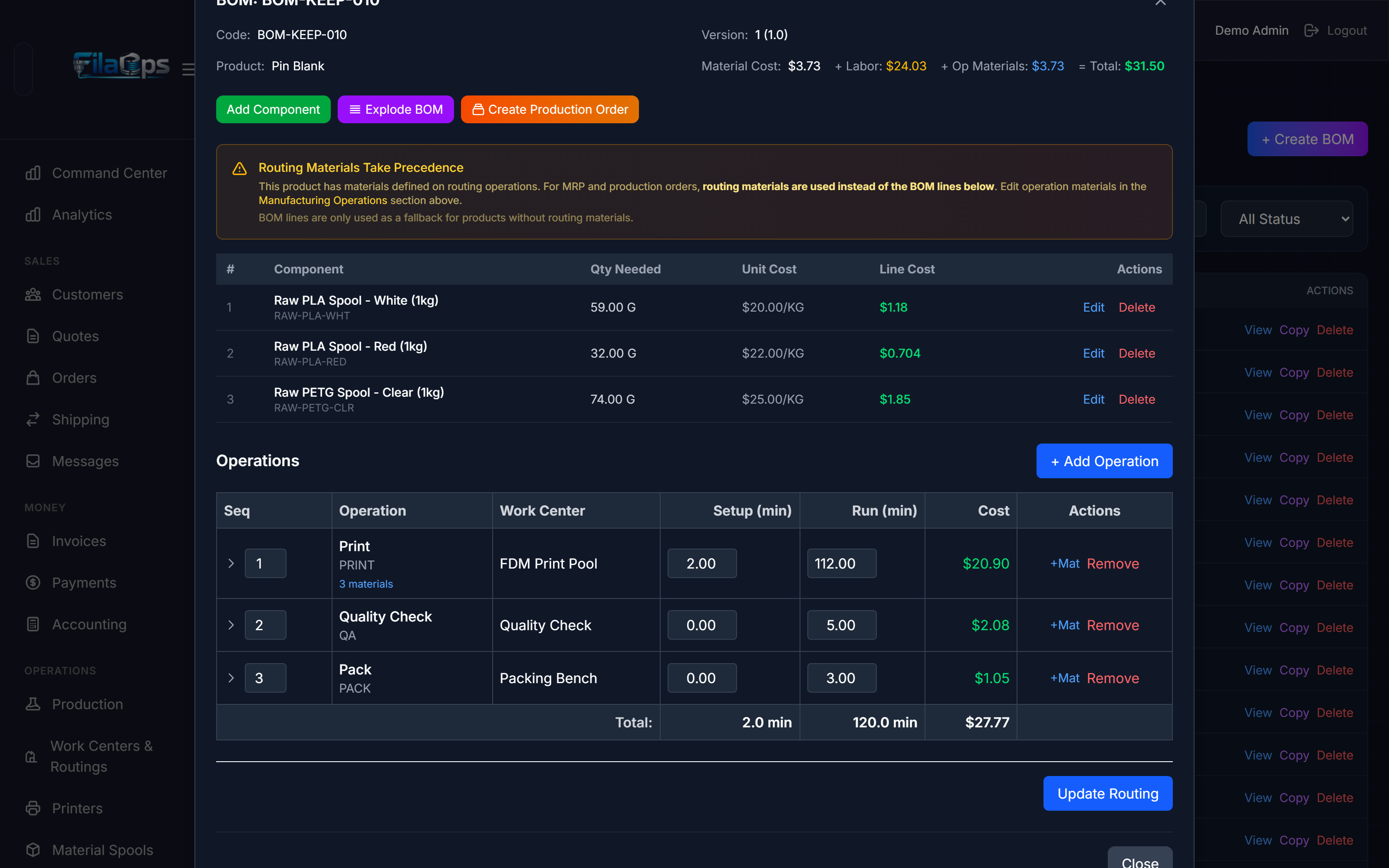
A live, read-only view (Admin > Purchasing > Buy List) that shows every component currently short across all open sales orders and open production orders. The buy list nets gross demand against on-hand inventory, allocated stock, incoming purchase orders, and safety stock. It is computed fresh on every page load — there is no stale MRP snapshot. Use it as a daily purchasing checklist.
C
Chart of Accounts (COA)
The hierarchy of GL accounts used for double-entry bookkeeping. Accounts are classified as asset, liability, equity, revenue, or expense. FilaOps ships a default COA with Schedule C line mappings for U.S. sole proprietors. Accessible under Admin > Accounting > Accounts.
Close Short
An action that accepts a partially fulfilled sales order or production order as complete, rather than waiting for the remaining quantity. A Close Short Record captures before-and-after state for audit purposes. The sales order field closed_short is set to true and the order moves to completed status.
COGS (Cost of Goods Sold)
The cost of materials and labor consumed to produce items that were shipped and recognized as revenue. FilaOps posts COGS journal entries automatically when a sales order is shipped. COGS data is visible in Admin > Accounting > COGS.
Command Center
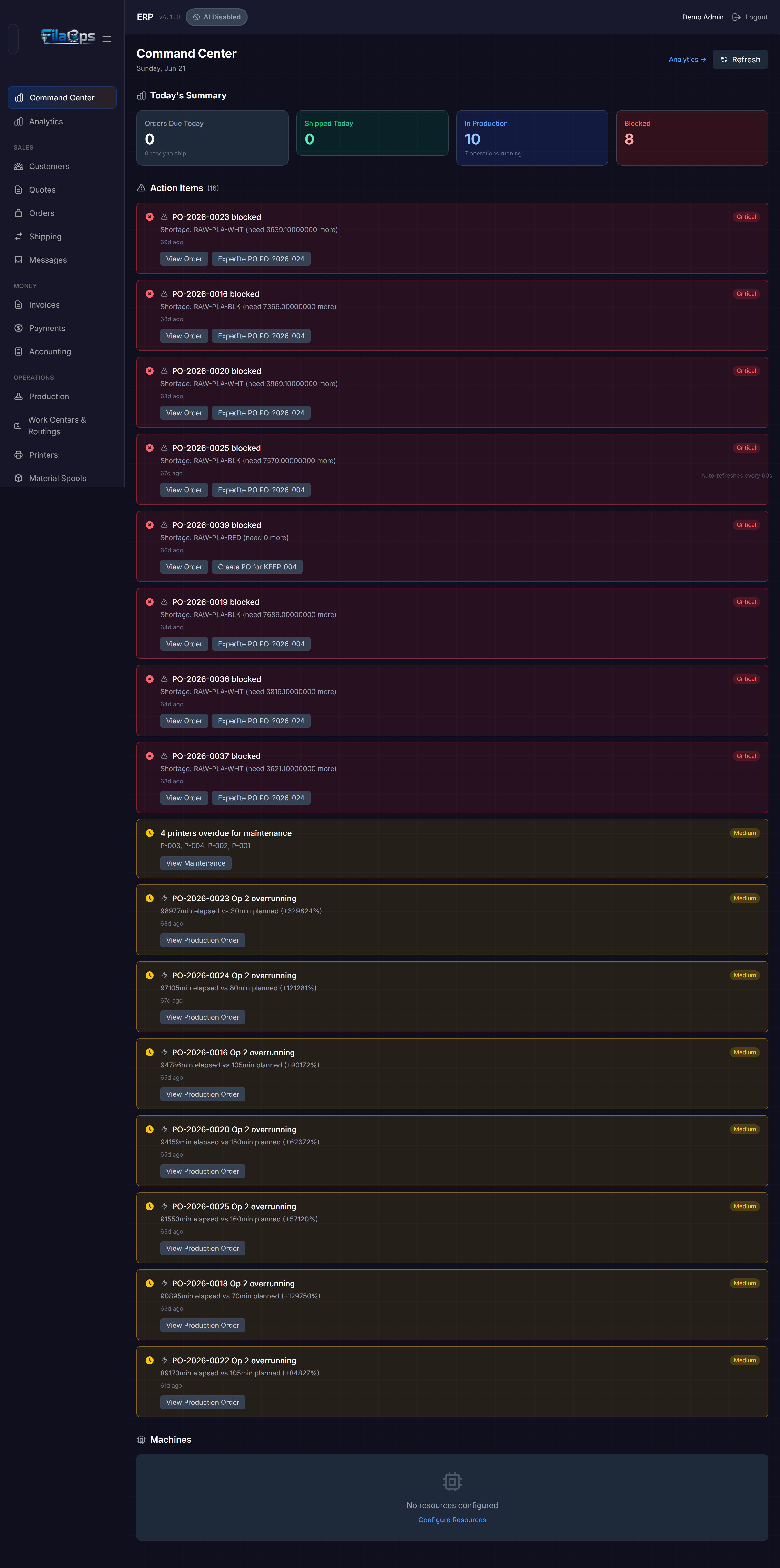
A real-time operations dashboard at Admin > Command Center that answers "What do I need to do right now?" It surfaces prioritized action items:
- Blocked production orders — orders whose materials are short (highest priority)
- Overdue sales orders — past their due date
- Orders due today
- Overrunning operations — exceeding 2x their estimated time
- Idle resources — machines with work waiting
It also shows a summary of today's output, resource statuses, and machine availability.
Component
An item used as an input in a BOM — a sub-part, hardware insert, or consumable. In the item catalog (item_type = 'component'), components appear separately from finished goods and packaging.
Consumption
An inventory transaction (transaction_type = 'consumption') that removes material from stock when it is used in a production operation. Consumption quantities are calculated from the BOM line quantities multiplied by the production order quantity. A GL journal entry is created simultaneously.
Cost Method
Determines how FilaOps values inventory and calculates COGS. Each product can use one of three methods:
| Method | Description |
|---|---|
average | Running weighted average cost. Default for most items. |
standard | Fixed standard cost set manually. Variances are posted to a GL account. |
fifo | First-In, First-Out — lot-level cost tracking. |
Customer (Record)
A business or individual that appears in Admin > Customers, identified by a CUST-XXXXX customer number. A Customer record can be linked to one or more portal Users for B2B ordering. Customers have payment terms, credit limits, and optional traceability profiles.
Cycle Count
A physical count of items in a specific location, compared against the system's on-hand quantity. FilaOps guides you through the count at Admin > Inventory > Cycle Count, then shows a variance review modal before posting any adjustments. Posting a cycle count stamps a baseline_timestamp on the inventory row, starting a new reconciliation epoch.
D
Dispatch
The act of assigning a specific production order operation to a specific printer or resource so it can start running. Admin > Production > Dispatch shows ranked suggestions for each idle printer, including a "why this job" explanation and a maintenance warning if a scheduled maintenance window falls before the job would finish. Dispatching sets the operation status to queued and links it to the assigned machine.
Draft (Order)
A sales order that has been started but not yet confirmed. Draft orders do not generate MRP demand and are not visible in the production queue.
Draft (Production Order)
A work order (WO) that has been created but not yet released. Materials have not been allocated. A draft WO can be edited freely.
E
ERP
Enterprise Resource Planning. A system that integrates core business processes — inventory, production, purchasing, sales, and accounting — in one place. FilaOps is an ERP designed specifically for 3D print farms.
F
Finished Good
A product that is ready to sell (item_type = 'finished_good'). Finished goods are manufactured from raw materials and components using a BOM and routing, and are tracked in inventory after production closes.
Firmed (Planned Order)
An MRP-generated planned order that an operator has approved by clicking Firm. Firmed orders will not be deleted when the next MRP run occurs. The next step is to Release the firmed order, which converts it into an actual purchase order or production order.
First-Pass Yield
A quality metric visible in Admin > Production > Quality. It measures the percentage of production orders that pass QC inspection on the first attempt, without rework or scrap.
Fleet Management / Printers
The section under Admin > Printers that tracks your 3D printers — their brand (Bambu Lab, Klipper, OctoPrint, Prusa, or generic), IP address, MQTT topic, work center assignment, and current status (idle, printing, paused, error, maintenance, offline).
Fulfillment Status
An internal status on a sales order (and on each sales order line for multi-line orders) that tracks shipping progress independently of the order-level status. Values: pending, ready, picking, packing, shipped, delivered, short_closed.
G
GL Journal Entry
A double-entry bookkeeping record. Every financial event in FilaOps (order shipped, material received, inventory adjusted) auto-posts a GL journal entry with matching debit and credit lines. Journal entries progress from draft to posted; posted entries are locked. Voided entries are preserved for audit.
Grand Total
The total amount charged to a customer on a sales order: total_price + tax_amount + shipping_cost. Stored in the grand_total column.
Gross Profit
Revenue minus COGS, expressed as a dollar amount.
I
Invoice
A billing document generated from a sales order, sent to the customer. Invoices follow a draft → sent → paid lifecycle (also overdue and cancelled). Payment terms on the invoice determine the due date. Accessible at Admin > Invoices.
Inventory Location
A named physical place where inventory is stored — a warehouse, shelf, bin, staging area, or QC zone. Locations can be nested (a bin inside a shelf inside a warehouse). Each (product, location) pair maintains its own on-hand and allocated quantities. Managed at Admin > Inventory > Locations.
Inventory Reconciliation
A report at Admin > Inventory > Reconciliation that compares each item's stored on_hand_quantity to the sum of all inventory transactions since the last physical count (baseline). Items where the two figures differ are flagged as drift. Post a physical count from this screen to resolve drift and reset the epoch.
Inventory Transaction
Any event that changes an item's on-hand quantity. Types include:
| Type | Triggered by |
|---|---|
receipt | Purchase order received |
consumption | Production operation completes |
shipment | Sales order shipped |
adjustment | Manual cycle count or correction |
transfer | Move between locations |
scrap | Material or part scrapped |
All transactions are immutable; they can be voided but not deleted.
Item
The generic term for anything tracked in FilaOps. Items fall into types set by the item_type field on the product:
| Type | Used for |
|---|---|
finished_good | Products sold to customers |
component | Sub-parts used in BOMs |
packaging | Boxes, mailers, labels |
supply | General consumables |
service | Non-physical items (machine time, labor) |
Materials (filament) are typically typed as supply or component with is_raw_material = true.
L
Lead Time
The number of days between placing a purchase order with a vendor and receiving the materials (lead_time_days on a product). MRP uses lead time to calculate when to place a planned order so materials arrive before they are needed.
Location
See Inventory Location.
Lot
A batch identifier assigned to a group of materials received together from a vendor, or produced together in one production run. Lots are created as Material Lots when a purchase order is received. Lot tracking enables recall traceability: "Which finished goods used material lot PLA-BLK-2026-0042?"
M
Make-to-Order (MTO)
A production strategy where a work order is produced for a specific sales order. When the WO closes, the finished good ships directly rather than going to shelf stock. Set via order_type = 'MAKE_TO_ORDER' on the production order.
Make-to-Stock (MTS)
A production strategy where a work order produces inventory that sits on the shelf until ordered. Set via order_type = 'MAKE_TO_STOCK'.
Maintenance Log
A record of maintenance activity performed on a printer — routine cleaning, repair, calibration, or nozzle change. Includes downtime minutes for efficiency tracking. Accessible under Admin > Printers > [Printer] > Maintenance.
Maintenance Window
A planned block of time during which a printer or resource is unavailable for production. The scheduling engine treats maintenance windows as busy time. When a window becomes active, the printer's status changes to maintenance automatically. Completing a window writes a Maintenance Log. Managed at Admin > Printers.
Material Lot
See Lot.
Material Substitution
When a production order cannot use the material specified in the BOM (wrong color available, out of stock), an operator can record a substitution override that specifies an alternate material. The override captures the original BOM item, the substitute, the quantities, and the reason — ensuring correct inventory consumption and COGS accuracy.
MRP (Material Requirements Planning)
A planning engine accessible at Admin > MRP that calculates what components need to be ordered or manufactured, in what quantities, and when. MRP reads:
- Confirmed sales orders as demand
- Current on-hand inventory
- Active BOMs for each finished good
- Lead times and safety stock from the product catalog
Each MRP run produces a set of Planned Orders and records an audit trail (MRPRun) including how many orders were processed, how many shortages were found, and how many planned orders were created. MRP does not write purchase orders or work orders directly — it creates suggestions that operators review and firm.
N
Net Shortage
The quantity of a component that is required but not available after accounting for on-hand inventory, incoming purchase orders, and safety stock. A positive net shortage triggers a Planned Order in MRP.
O
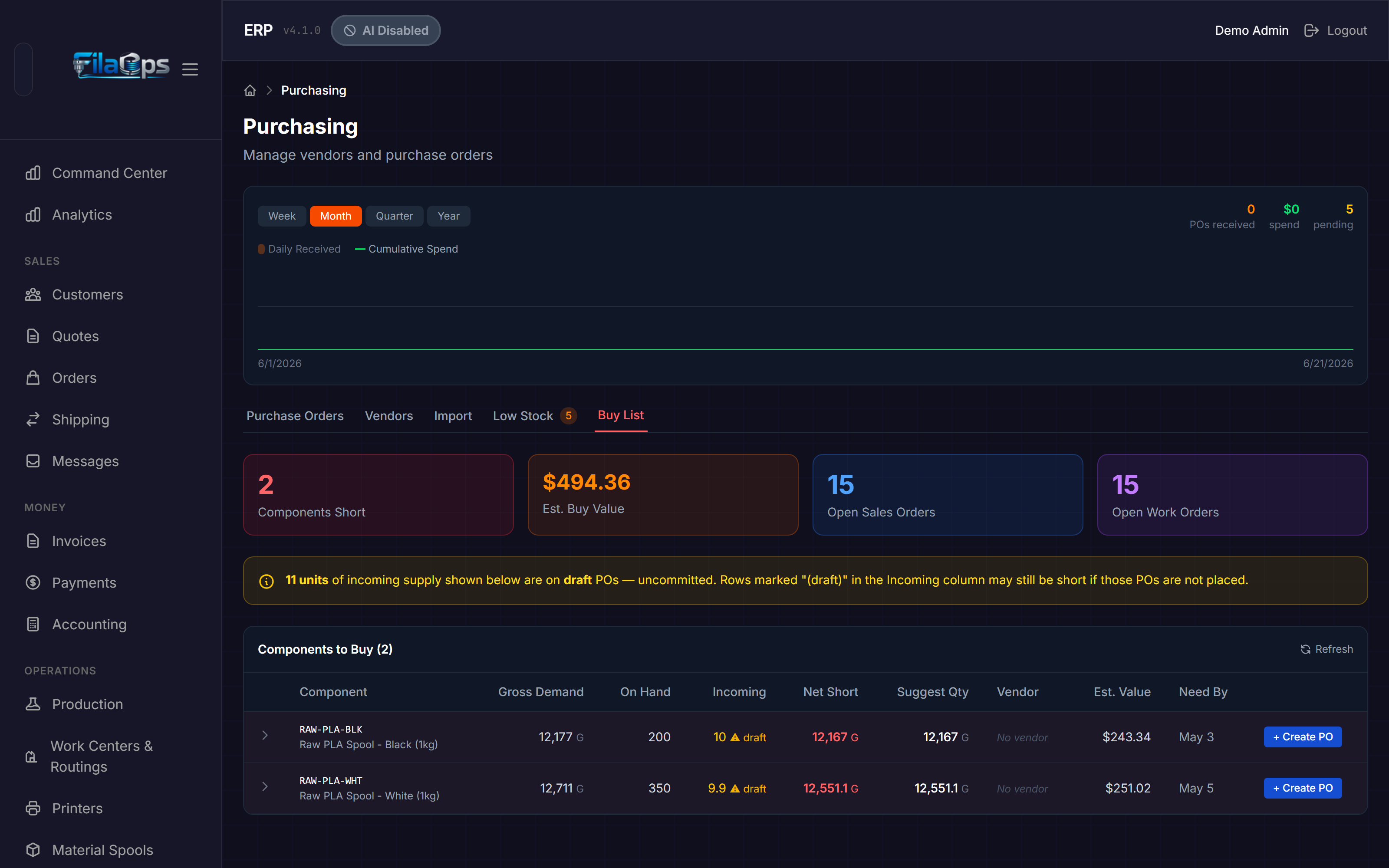
Operation
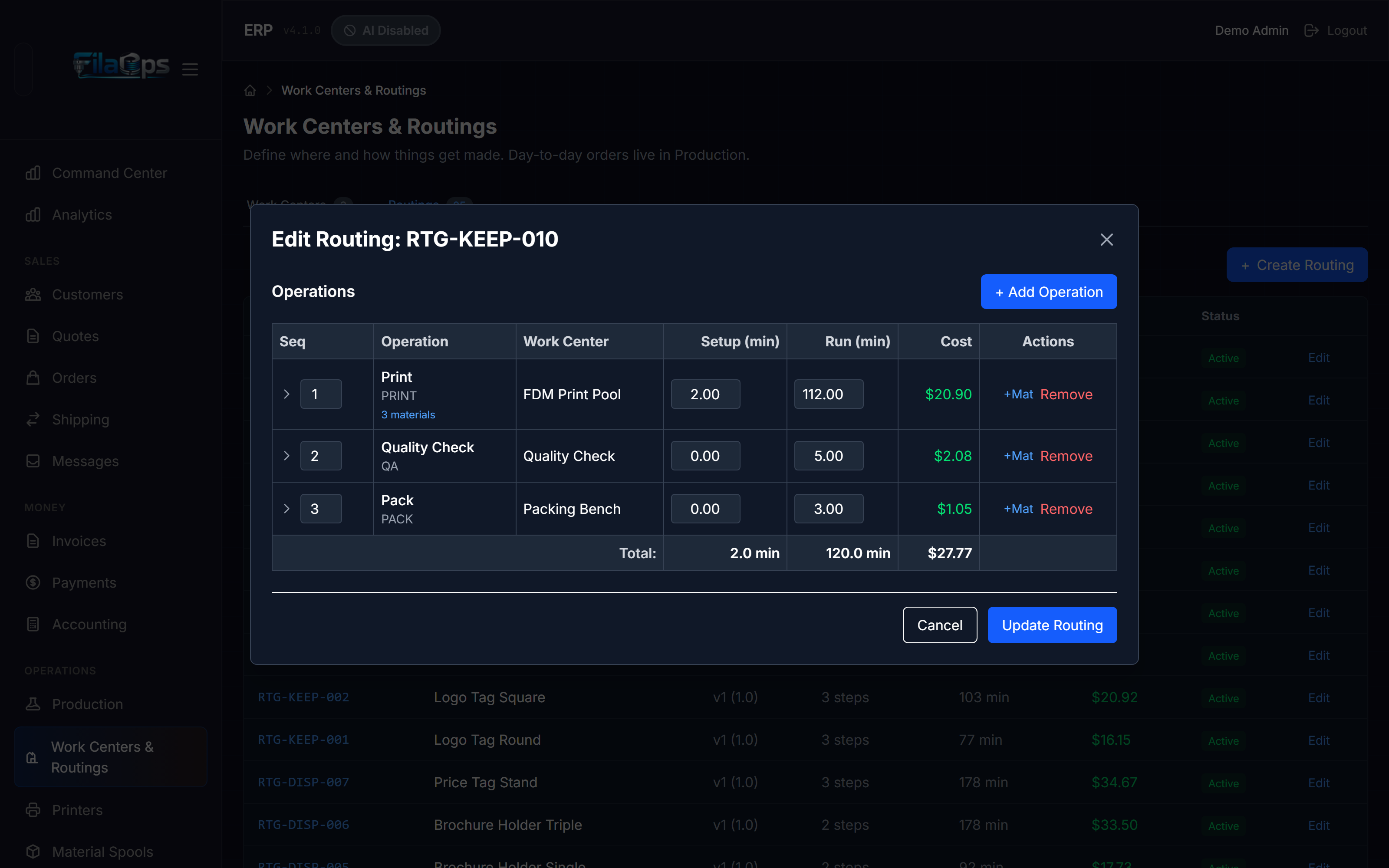
A single step in a routing (for example, "Print," "Remove Supports," "QC Inspect," "Pack"). Each operation has:
- A work center assignment
- Planned setup time and run time in minutes (plus optional wait and move times)
- Optional materials consumed at that step (per unit, per batch, or per order)
- A sequence number that determines execution order
- Optional predecessor operation for dependency chaining
When a production order is released, routing operations are copied onto the WO as Production Order Operations with their own status (pending, queued, running, complete, skipped).
OctoPrint
Open-source 3D printer management software. FilaOps can connect to printers running OctoPrint by entering the printer's IP address and API key in Admin > Printers.
Operator
A user role (account_type = 'operator') with permissions focused on day-to-day production tasks. Operators can update operation status, record consumption, and dispatch jobs, but cannot change system settings or manage other users.
P
Payment
A payment record against a sales order (PAY-YYYY-XXXX). Payments support multiple payment methods (cash, check, credit card, PayPal, Venmo, Zelle, wire, or other), partial payments, and refunds (negative amounts). All payments are recorded in Admin > Accounting > Payments.
Payment Terms
The agreed schedule for when a customer pays an invoice. Core supports: cod (cash on delivery), prepay, net15, net30, net60, and card_on_file. Payment terms are set on the Customer record and can be overridden per invoice.
Planning Horizon
The number of days ahead that an MRP run looks when calculating material requirements. A 30-day horizon plans one month of demand. Configured per MRP run at Admin > MRP.
Planned Order
An MRP-generated suggestion to purchase or manufacture materials. Planned orders are proposals only — they must be Firmed by an operator before they persist across MRP runs, then Released to become actual purchase orders or work orders.
Planned order statuses: planned → firmed → released → cancelled.
Print Job
A record that links a specific printer to a production order operation while it is running. Print jobs capture the Bambu task ID or slicer file path, the assigned printer, and start/end times for run-time tracking. Visible in the production order detail view.
Procurement Type
Determines how FilaOps sources a product:
| Type | Meaning |
|---|---|
buy | Purchased from a vendor |
make | Manufactured in-house using a BOM |
make_or_buy | Either — chosen per production run |
Production Order (Work Order, WO)
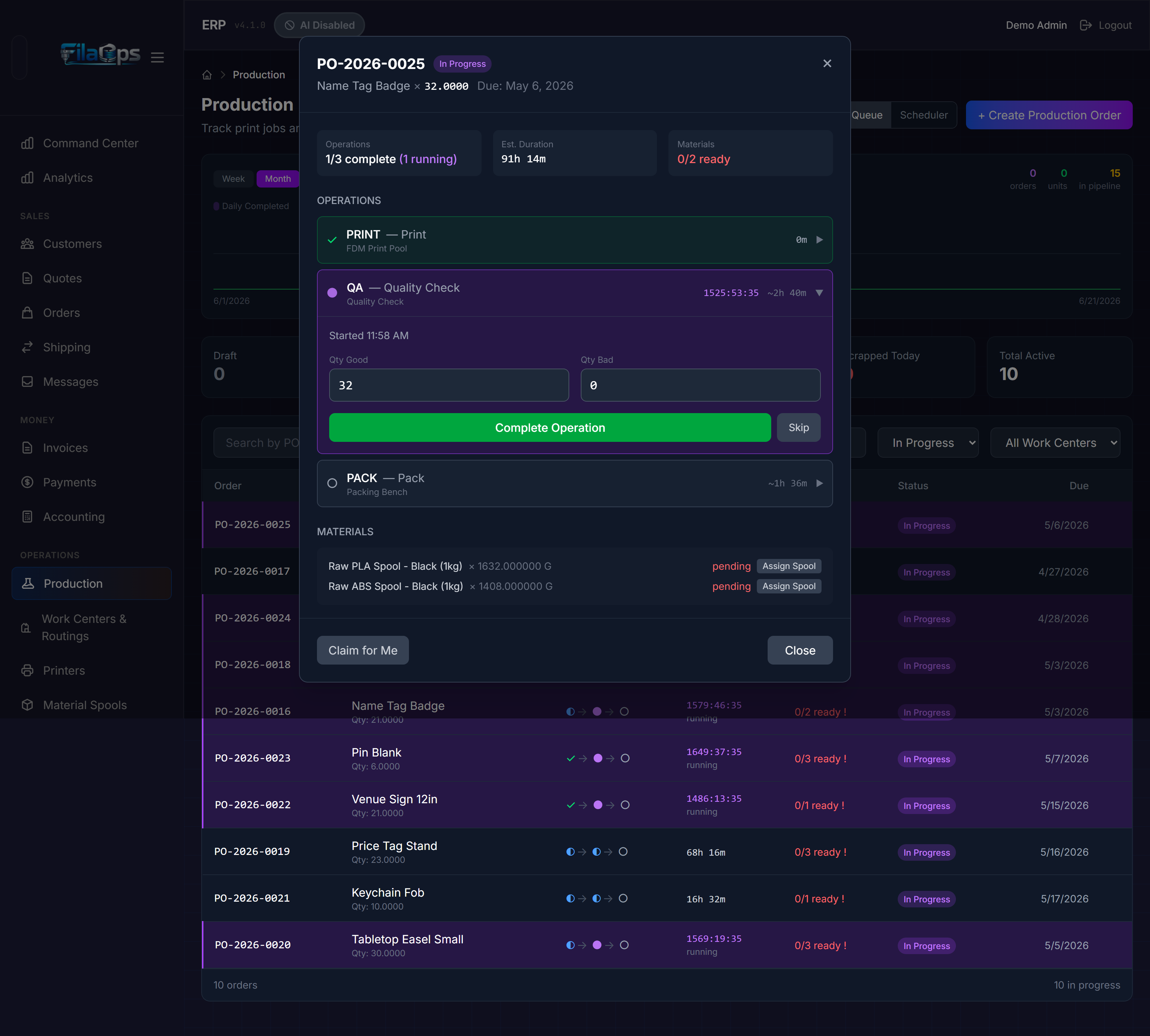
The core manufacturing document. A production order (also called a work order or WO in the UI) tracks manufacturing a specific quantity of a product. Key fields:
- Code — e.g.,
WO-2026-001 - Quantity ordered / completed / scrapped
- Status —
draft → released → scheduled → in_progress → completed → qc_hold → closed(alternate paths:scrapped,cancelled,on_hold) - QC status —
not_required,pending,in_progress,passed,failed,waived - Priority — 1 (highest) to 5 (lowest)
- Make-to-Order or Make-to-Stock flag
- BOM and routing used at the time of release
Production orders can be split (one parent WO into multiple child WOs) or linked as a remake of a failed WO.
Purchase Order (PO)
A formal request to a vendor to supply materials at a specified price and quantity (PO-YYYY-XXX). PO lifecycle: draft → ordered → shipped → received → closed. When a PO is received, inventory transactions and GL journal entries are posted automatically. Accessible at Admin > Purchasing.
Q
QC Hold
A production order status indicating that the job finished but failed quality inspection. A WO in qc_hold is awaiting a decision: scrap it, rework it, or waive the failure with a documented reason.
QC Status
The quality control stage for a production order. Values:
| Status | Meaning |
|---|---|
not_required | Auto-passes; trusted product type |
pending | Awaiting assignment to an inspector |
in_progress | Inspector is reviewing parts |
passed | Parts accepted; WO can close |
failed | Parts rejected; WO moves to qc_hold |
waived | Failed but accepted anyway (reason required in notes) |
Quote
A price estimate prepared for a customer before they commit to an order. Quotes can be created manually by an admin or submitted by a customer through the portal. Quote statuses: pending → approved → accepted → converted (or rejected, expired, cancelled). Once a customer accepts a quote, it converts to a Sales Order. Quote numbers follow the format Q-YYYY-NNN.
R
Raw Material
An input material used in production — filament, screws, packaging, etc. In the product catalog, raw materials are typically typed as supply or component with is_raw_material = true. Raw materials appear in BOMs and are consumed during production.
Receipt
An inventory transaction (transaction_type = 'receipt') that adds materials to stock when a purchase order delivery arrives. Receipts update on-hand quantities, calculate average or FIFO cost, allocate landed costs (shipping and tax), and post a GL journal entry.
Reconciliation
See Inventory Reconciliation.
Remake
A production order created to replace a scrapped WO. A remake WO is linked to the original failed WO via the remake_of_id field, creating a traceable chain for failure analysis.
Reorder Point
The minimum on-hand quantity below which an item appears in the Low Stock list in Admin > Purchasing. Set per product in the item catalog (reorder_point field).
Resource
An individual machine within a work center — for example, the Bambu X1C printer named "Leonardo" inside the "FDM Pool" work center. Resources have a status (available, busy, maintenance, offline) and can be assigned to specific routing operations during scheduling. Resources support Bambu Lab integration via a device ID and IP address.
Routing
A versioned template that defines how a product is manufactured — the ordered sequence of operations, with work center assignments, estimated times, and per-operation material requirements. A product can have multiple routing versions; only the active one is used for new production orders.
Routings can also be defined as templates (no product assigned) that are later applied to multiple products. A routing's total cost is the sum of its operations' time-based costs plus per-operation material costs.
Rush Level
A priority classification on a sales order or quote that affects scheduling priority. Values: standard, rush, super_rush, urgent. Rush level feeds into the dispatch suggestion ranking.
S
Safety Stock
Extra inventory kept on hand as a buffer against unexpected demand or supply delays. MRP considers safety stock when calculating net shortages — it suggests ordering enough to keep on-hand above the safety stock level. Set per product in the item catalog (safety_stock field).
Sales Order
A confirmed commitment from a customer to purchase products at agreed prices (SO-YYYY-XXX). Sales orders have two parallel status tracks:
Order status (customer-facing): draft → pending_payment → confirmed → in_production → ready_to_ship → shipped → delivered → completed (alternate paths: payment_failed, partially_shipped, on_hold, cancelled)
Fulfillment status (internal logistics): pending → ready → picking → packing → shipped → delivered
Confirmed sales orders with payment_status = paid (or partial) can trigger production order creation. Accessible at Admin > Orders.
Tip
The order status and fulfillment status are deliberately separate. An order can be in_production while fulfillment is still pending, and can be shipped (fulfillment) while still showing ready_to_ship on the customer-facing track until you mark delivery confirmed.
Scrap
A production outcome where a manufactured item or material fails quality standards and cannot be sold or reworked. Scrapped production orders record a Scrap Reason, the quantity scrapped, unit cost at time of scrap, and links to the inventory transaction and GL journal entry for full auditability.
Scrap Factor
A percentage added to a BOM line quantity or routing operation material quantity to account for expected waste during production. Example: a BOM line specifying 100g of filament with a 5% scrap factor will plan 105g for consumption.
Scrap Reason
A configurable code that explains why a production order or operation was scrapped — for example, layer_shift, adhesion, spaghetti, or wrong_material. Scrap reasons are configured at Admin > Settings > Scrap Reasons and appear as a dropdown when marking a WO as scrapped.
Scheduler / Gantt
The visual scheduling board at Admin > Production > Scheduler that displays machine lanes (Resources and Printers) with operations plotted as Gantt bars across a configurable time window. From the board, operators can assign operations to machines and time slots, and see maintenance windows blocking capacity.
Serial Number
A unique identifier (BLB-YYYYMMDD-XXXX) assigned to an individual finished product when a production order closes. Enables warranty tracking, returns management, and full material traceability at the unit level. Only generated for products with track_serials = true.
SKU (Stock Keeping Unit)
A unique code that identifies a specific product in the FilaOps catalog. SKUs are used for barcode scanning, sales channel integration (WooCommerce, Squarespace), and as the primary display identifier across lists and reports.
Spool
A physical roll of 3D printing filament tracked individually in FilaOps at Admin > Spools. Each spool record includes a spool_number, the linked material product, initial_weight_kg, current_weight_kg (estimated remaining), status (active, empty, expired, damaged), and an optional supplier lot number for traceability. Spools used in a production order are linked in the production order detail.
Stocking Policy
Controls how FilaOps manages a product's inventory:
| Policy | Behavior |
|---|---|
stocked | Keep minimum on hand; reorder when quantity drops to the reorder point |
on_demand | Only order when MRP shows active demand |
T
Tax Rate
A named tax rate (for example, "TX Sales Tax — 8.25%") configured at Admin > Settings > Tax Rates. Tax rates are snapshotted onto quotes and orders at the time they are created so that rate changes do not affect historical records.
Tax Center
The tab at Admin > Accounting > Tax Center that summarizes tax collected on shipped orders, broken down by tax rate and time period.
Traceability
The ability to track materials and finished goods forward and backward through the supply chain. FilaOps supports four traceability levels, configurable per customer profile:
| Level | What is tracked |
|---|---|
none | No tracking (default for B2C) |
lot | Which material batch (lot) was used in each production order |
serial | Individual serial number per finished unit |
full | Lot + serial + Certificate of Conformance |
U
UOM (Unit of Measure)
The unit used to track an item's quantity. FilaOps uses a three-field system per product to handle items bought in bulk but consumed in smaller units:
| Field | Description | Filament example |
|---|---|---|
unit | Storage and consumption unit | G (grams) |
purchase_uom | The unit you buy in | KG (kilograms) |
purchase_factor | 1 purchase unit = X storage units | 1000 |
This means filament purchased as "3 KG @ $20/KG" is stored as 3,000 grams at $0.02/g. BOM quantities, consumption records, and inventory all use the storage unit. Purchase orders use the purchase unit. Costs are stored per purchase unit and divided by purchase_factor to get per-storage-unit costs.
V
Vendor
A supplier that provides raw materials, components, or packaging. Vendors are linked to purchase orders and to products (as the preferred_vendor_id). Vendor records store contact information, payment terms, and lead times. Accessible at Admin > Purchasing > Vendors.
W
Work Center
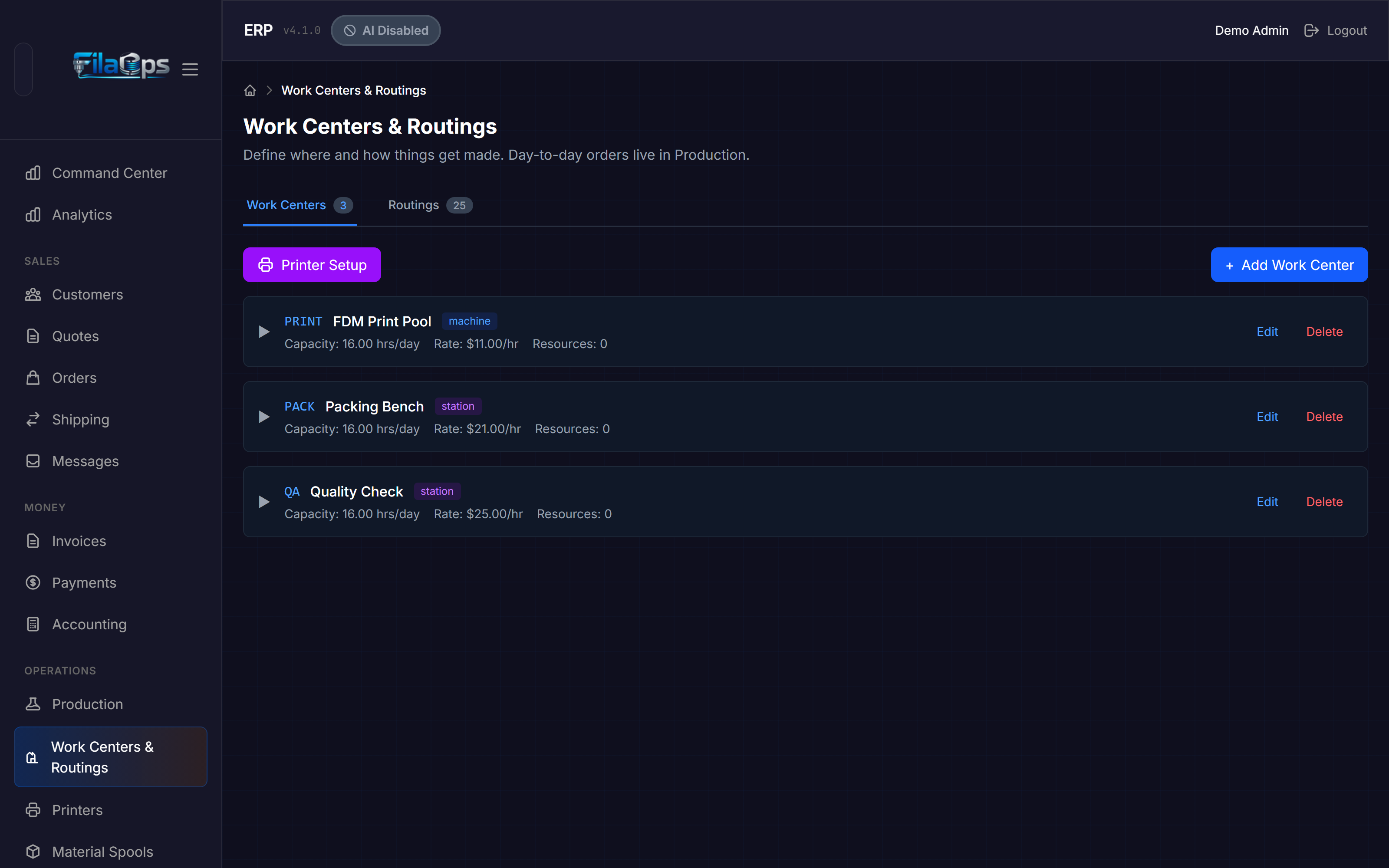
A logical production area or department that groups one or more Resources. Examples: "FDM Pool" (contains multiple FDM printers), "Post-Processing," "QC Station," "Shipping." Work centers have:
- Capacity settings (hours per day, units per hour)
- Hourly rates (machine, labor, overhead) used for job costing
- A bottleneck flag for scheduling priority
- A scheduling priority score (1 = highest, 10 = lowest)
Routing operations are assigned to a work center; the scheduling engine then dispatches them to a specific resource within that center.
Work Order (WO)
See Production Order.